SpotM
IT IS better late than never for Yahoo! as the California-based Internet giant plans to launch a social networking site this year, made in India - and for India. "We will be launching our social networking platform SpotM this year," said a Yahoo official who did not wish to be identified. Yahoo already has Internet message boards like Yahoo Groups that allows users to post messages. Through this launch, the company wants to compete with hugely popular social networking platforms Orkut and Facebook. The company's research and devel- opment centre in Bangalore has designed and tested the website. This will only cater to Indian Internet users. Yahoo is expected to roll out an invite-only beta (trial) version soon followed by an open-for-all community later this year SpotM wW enable a "seamless marriage" between mobile and web interface, the official said. It is expected to offer features like anonymous chat that will allow users to chat via a text message while keeping their mobile numbers intact. Gopal Krishna, vice-president and head of audience for the emerging markets is heading the team working on SpotM. Social networking enabled by interactive Web 2.0 technology enables users to not just receive information from the web but also add and share content. It is expected to be one of the biggest drivers of Internet usage in the coming years. In the list of top 10 websites in India measured by Alexa that provides information on we traffic, Google leads followed by Yahoo in terms of both traffic and page views. Interestingly Google's other content sharing sites such as Orkut and You Tube also feature on the list while there is none that Yahoo can claim.
Christmas Cards Made Easy - Shutterfly, Excel, and a Word Mail Merge
via Scott Hanselman's Computer Zen by Scott Hanselman on 12/2/08
 The Wife was stressing out because the sheer number of people we were sending Christmahanakwanzika cards to this year. She usually handwrites out the envelopes, but there's just too many now. I suggested cutting back, or using email, and was prompted put in my place.
I suggested a Mail Merge, and while The Wife is a competent Microsoft Office user, the Mythical Mail Merge is still out of reach. I don't think I've met a non-programmer who has pulled it off. It's a shame really, especially when it comes to envelopes.
The goal was to get 100s of cards out in about an hour, with a small 3-day pause in the middle as we waited for the cards to show up from Shutterfly.
Step 0 - Get a Card
This was easy. We had a 4x8 card made at http://www.shutterfly.com, which I've been using happily since Day 1, by the way. They are cheap and fast and reliable.
Step 1 - Get the Names and Addresses
 We used to have everything in Outlook, but you know, things get messy. We ended up making an Excel Spreadsheet that ended up on the web as a Google Spreadsheet. We pulled addresses in from all over, Evites, emails, old envelopes, whatever. The goal was/is to collect all the times. We used the really simple format Name, Street, and one single CityStateZip field, rather than splitting things up with the whole City, State, Zip. We have a lot of international people, so it was easier.
We saved the spreadsheet as a CSV, but Word doesn't really care...it can read most any kind of data. We could have just saved it as a XLS file.
Step 2 - Start the Merge in Word
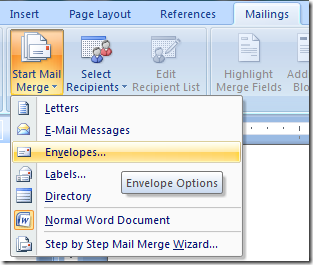
You may hate Word 2007 and the new Ribbon, but it's REALLY growing on us. Click Mailings, then Start Mail Merge. Select Envelopes...Pick your envelope size. Select the file with your recipients/relatives in it. I selected our CSV.
If you like, you can click Edit Recipient List and tidy up your data, maybe remove a cousin or two.
Step 3 - Lay out your Envelope
Next, click "Address Block" to put the address in your envelope.
This next part is the MOST important. Click "Match Fields" and make sure that Word figured out where you want things to go:
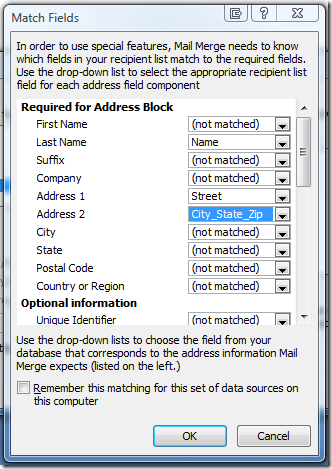
Here I had to tell Word about my funky mapping (that we had only one field for City, State, Zip).
Step 4 - Print and Chill
Click OK, and preview your document. If you like it, stack your envelopes up in your printer and print your holiday troubles away.
This might seem like a trivial or silly post to you, but The Wife thought it was about the greatest thing she's ever seen. It's funny how I've got the whole house networked, we've got video streaming from the Xboxes in two rooms, but The Wife is impressed with a mail merge. Anyway, it took about an hour and saved her at least a weekend. I say +2 Charisma for me this week. :)
Subscribe to:
Posts (Atom)